I tested the early access closed beta of Red Hat's AI code assistant for Ansible — originally announced as Project Wisdom at AnsibleFest 2022 and later released as Ansible Lightspeed with IBM Watson Code Assistant. Here is my honest review after extensive testing.
Background: From Project Wisdom to Lightspeed
The journey of Ansible's AI assistant:
- AnsibleFest 2022: Red Hat announces "Project Wisdom" — an AI service to generate Ansible code
- Early 2023: Closed beta invitations sent to selected community members
- Red Hat Summit 2023: Official launch as "Ansible Lightspeed with IBM Watson Code Assistant"
- Late 2023: General availability of the free tier
- 2024: Enterprise tier with model customization via IBM watsonx
I received access to the closed beta in early 2023, before the public announcement.
Setup Experience
The setup process was straightforward:
Requirements
- Visual Studio Code (minimum 1.70.1)
- Red Hat Ansible VS Code extension
- Beta invitation from the Ansible Development Team
Installation
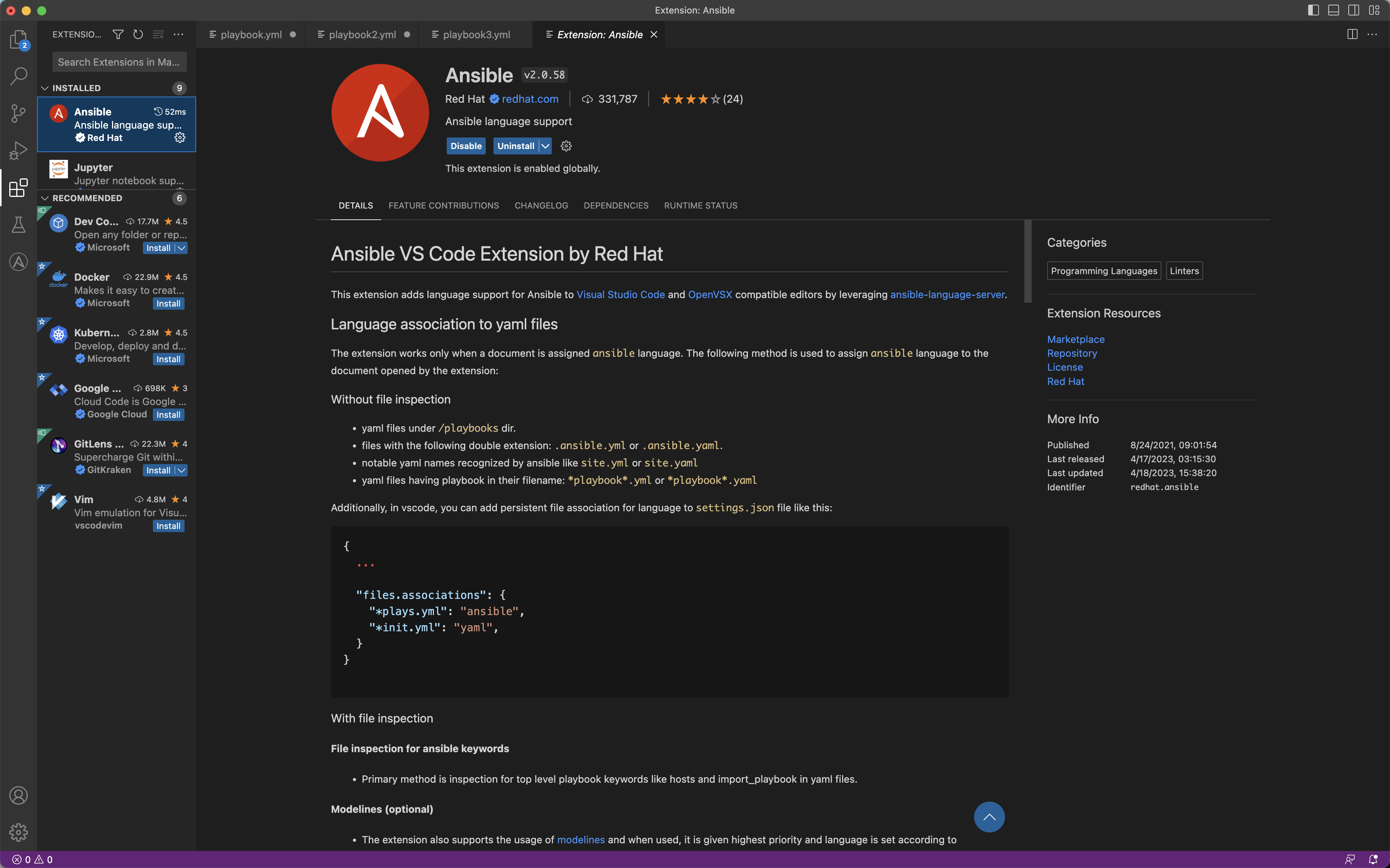
- Install the "Ansible" extension by Red Hat in VS Code:
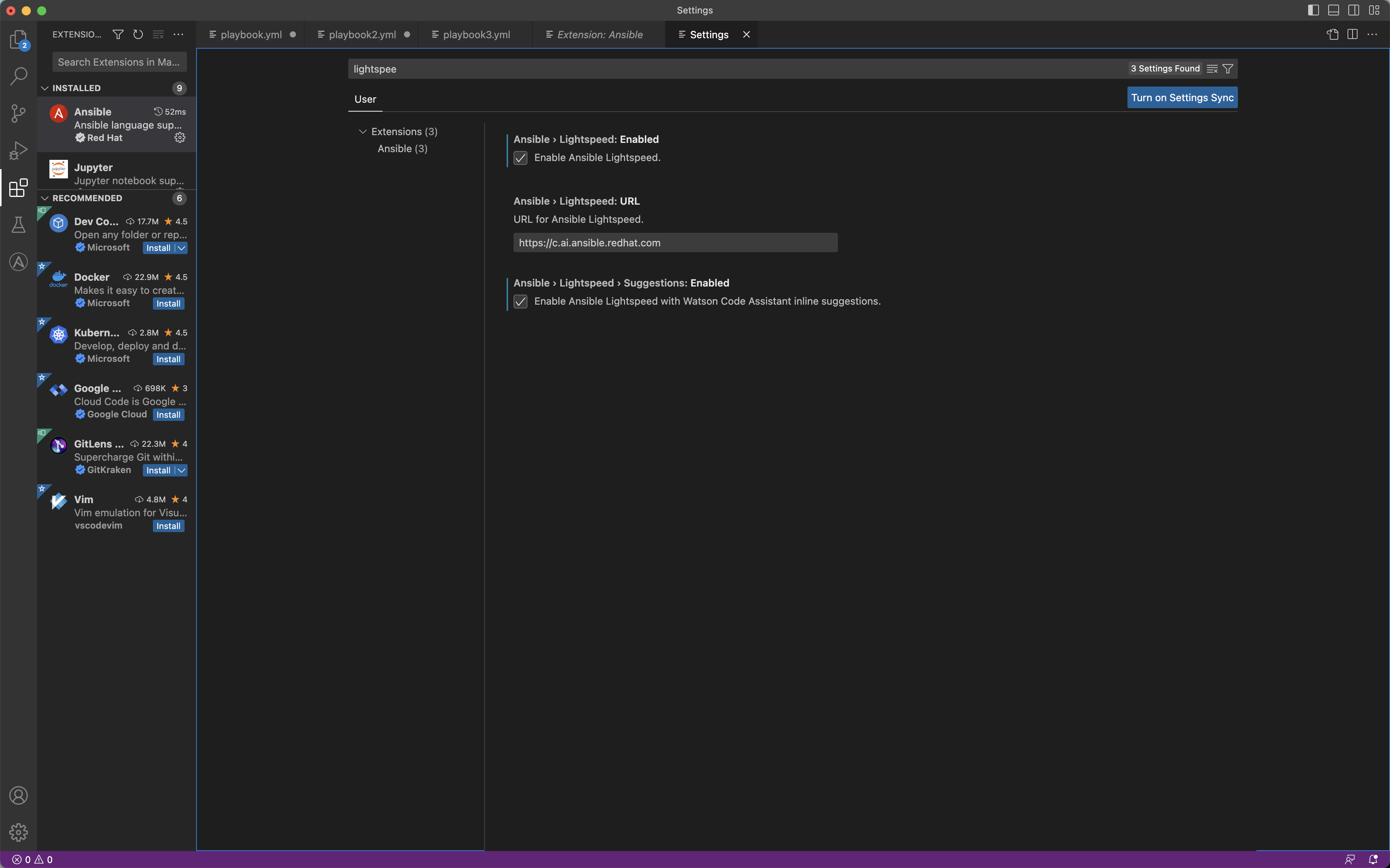
- Enable Ansible Lightspeed in the extension settings:
- Authenticate with your GitHub account (the beta required an invitation whitelist)
The entire setup took less than 5 minutes — no complex configuration or API keys needed.
How It Works in Practice
The plugin operates seamlessly within VS Code. When writing a playbook, each time you type a task name in the tasks: or handlers: section, the AI predicts the corresponding code block.

The workflow is:
- Type
- name:followed by a description of what you want - Press
Enterto move to the next line - Lightspeed shows a ghost text suggestion
- Press
Tabto accept, or keep typing to ignore
Testing Results: What Worked Well
Simple Tasks — Excellent Accuracy (90%+)
For common operations, Lightspeed performed remarkably well:
# Task name typed:
- name: Install nginx package on Ubuntu

# Generated (accurate):
  ansible.builtin.apt:
    name: nginx
    state: present
    update_cache: true
# Task name typed:
- name: Ensure firewalld service is running and enabled

# Generated (accurate):
  ansible.builtin.service:
    name: firewalld
    state: started
    enabled: true
Intermediate Tasks — Good Accuracy (70-80%)
# Task name typed:
- name: Create a cron job to run backup script every day at 2am

# Generated (mostly correct, sometimes needed minor tweaks):
  ansible.builtin.cron:
    name: "daily backup"
    hour: "2"
    minute: "0"
    job: "/opt/scripts/backup.sh"
Complex Tasks — Variable Results (40-60%)
For complex operations with multiple parameters or conditional logic, suggestions became less reliable:
# Task name typed:
- name: Deploy application with rolling update strategy limiting to 25% of hosts

# Generated (vague, needed significant editing):
  # Often produced incomplete or incorrect delegation/serial patterns
Strengths of the Beta
- FQCN awareness: Suggestions used fully qualified collection names (
ansible.builtin.aptnotapt), which is the modern best practice - Parameter accuracy: For common modules, parameter names and value types were correct
- Speed: Suggestions appeared within 1-2 seconds
- Context awareness: The model considered variables and hosts defined earlier in the playbook
- Beginner-friendly: Saved significant time for users who would otherwise be checking documentation
Limitations Found
- Complex logic: Struggled with
whenconditions, complex Jinja2 expressions, and multi-step logic - Uncommon modules: Accuracy dropped for niche collections (network, cloud-specific)
- Idempotency patterns: Sometimes generated non-idempotent approaches (e.g., using
shellinstead of a specific module) - No multi-task generation: In the beta, only single tasks were generated (the GA enterprise tier later added multi-task support)
- Occasional hallucination: Sometimes invented module parameters that don't exist
My Honest Assessment
For beginners: Ansible Lightspeed is genuinely valuable. It eliminates the constant back-and-forth between the editor and documentation. Even if suggestions need tweaking, they provide a solid starting point.
For experienced users: The value is in speed, not accuracy. You save time on boilerplate tasks (package install, service management, file operations) but still need to review and adjust for anything complex.
For production code: I would treat every suggestion as a draft. Always review the generated code, run ansible-lint, and test before deploying. The AI is a productivity tool, not a replacement for expertise.
Comparison: Beta vs GA Release
| Aspect | Beta (Early 2023) | GA (Late 2023+) |
|---|---|---|
| Authentication | Invitation-only | GitHub account |
| Model quality | Good for basics | Significantly improved |
| Multi-task | No | Yes (enterprise) |
| Content attribution | No | Yes |
| Model customization | No | Yes (enterprise) |
| Speed | 1-2 seconds | Sub-second |
The GA release improved substantially over the beta, particularly in accuracy for intermediate-complexity tasks and in understanding playbook context.
Comparison with General AI Tools
Having also tested ChatGPT and GitHub Copilot for Ansible:
- Lightspeed wins for FQCN compliance, module parameter accuracy, and Ansible-specific patterns
- ChatGPT produces longer explanations but sometimes generates deprecated or incorrect Ansible syntax
- GitHub Copilot is faster for general coding but lacks Ansible-specific training
For dedicated Ansible work, Lightspeed is the best choice. For mixed-language projects, Copilot's broader training can be useful alongside the Ansible extension.
Links
Related Articles
- Ansible Lightspeed Complete Guide: AI-Powered Automation
- Elevating Ansible Development with Visual Studio Code
- Ansible Best Practices for Production Environments
- Ansible Fully Qualified Collection Name (FQCN)
- How to Install Ansible Step-by-Step
- Ansible Debug Module Guide
Conclusion
The Ansible Lightspeed beta was an impressive early demonstration of purpose-built AI for infrastructure automation. While not perfect — especially for complex tasks — it showed clear potential as a productivity multiplier. The subsequent GA release and enterprise tier addressed many of the beta's limitations.
If you're writing Ansible daily, Lightspeed is worth enabling. It won't replace your expertise, but it will reduce the time you spend on repetitive tasks and documentation lookups. The road from Project Wisdom to today's product shows Red Hat's serious commitment to AI-assisted automation.