Introduction
There's a new Ansible feature in town, and I'm thrilled to announce the Ansible Policy utility, which can directly interact with the Open Policy Agent (OPA). If you're familiar with Kubernetes, you might already know OPA's popularity for specifying rules and validating projects against them.
This utility is particularly beneficial for organizations that need to ensure their projects comply with specific policies. For instance, in this example, I'll validate my playbook against a policy that restricts AWS EC2 machine allocation to the US East 1 and US East 2 regions. As you'll see, my playbook isn't compliant, as specified on lines 15 and 29, because it attempts to allocate machines in different regions.
By flagging non-compliance, we prevent the execution of configurations that don't meet our standards. So, why haven't you heard about Ansible Policy? Because it's a new prototype implementation that allows you to define and set OPA rules within your application using the Ansible Policy utility.
Architectural Diagram
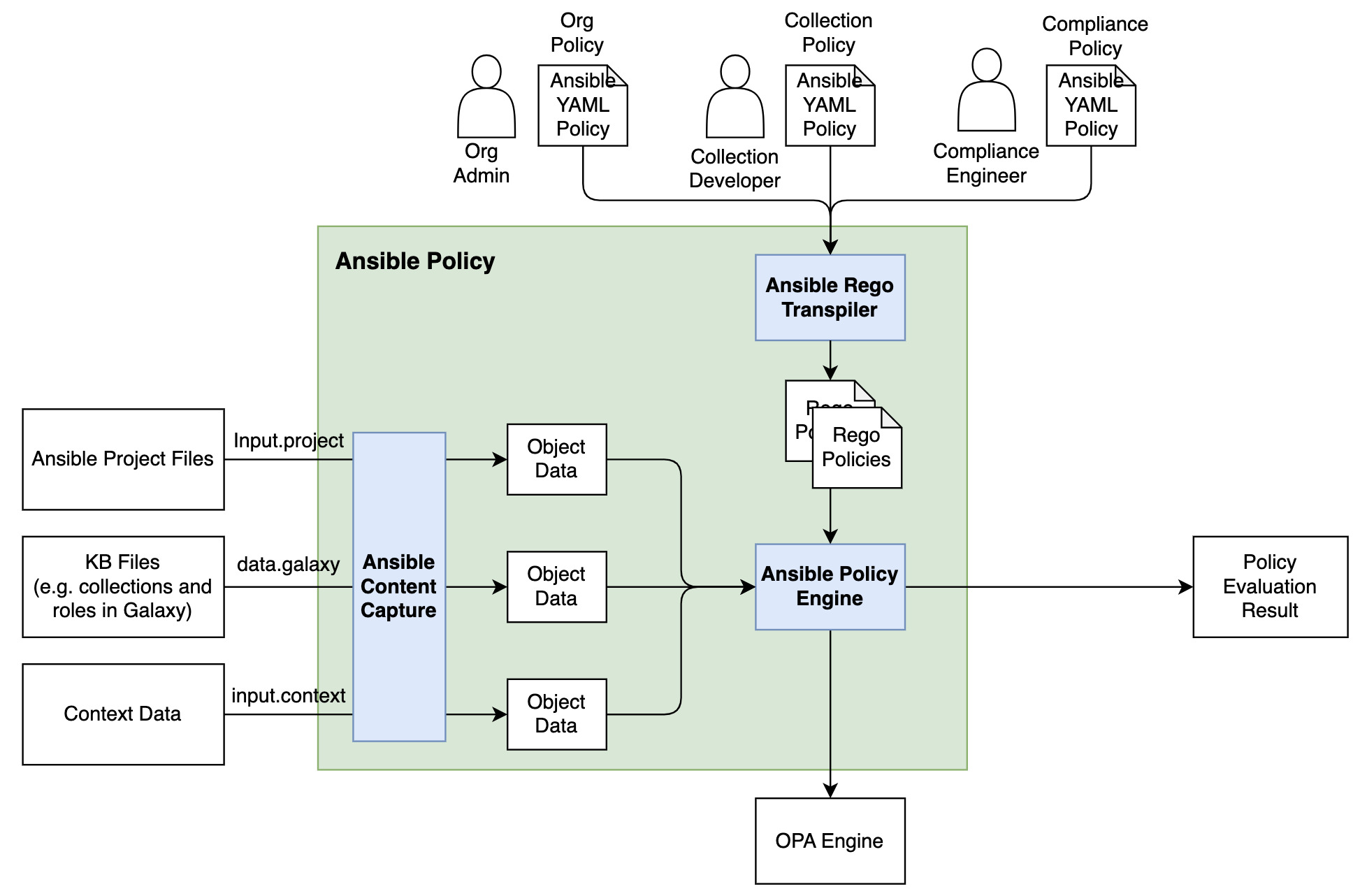
Here's an architectural diagram illustrating the interaction between the Ansible Policy engine, the Ansible repository, the rules, and how you can validate your project. Everything is integrated, relying on the API command by the Ansible Policy command line utility, which ultimately provides a validated or not validated result.
Installation Guide
To install the Ansible Policy command, follow these steps:
1. Set Up a Python Virtual Environment: Since this is an experimental feature, it's better to avoid cluttering your system with additional libraries.
``bash
python3 -m venv ansible-policy-env
source ansible-policy-env/bin/activate
`
2. Manual Installation: The Ansible Policy utility isn't available in the PyPI repository yet, so you'll need to install it manually.
`bash
pip install -e .
`
This command will download all necessary libraries and install them.
3. Dependency Management: You might encounter a few roadblocks if all dependencies aren't satisfied. First, deactivate and reactivate the virtual environment.
`bash
deactivate
source ansible-policy-env/bin/activate
`
4. Install Ansible: Ensure Ansible is installed within your virtual environment.
`bash
pip install ansible
``
5. Install Open Policy Agent: The OPA must be installed on your machine