How to configure Ansible for AWS?
Ansible provides various modules to manage AWS infrastructure, which includes EC2, VPC, Security Groups, etc.
I'll show you step by step how to prepare your Ansible controller to interact with the AWS infrastructure.
This initial configuration sometimes is a roadblock for some AWS users to start using Ansible.
I'm Luca Berton and welcome to today's episode of Ansible Pilot.
Configure Ansible for AWS
- Amazon Identity and Access Management (IAM) Access Key
- Python
boto3SDK requires 3.6+
- Ansible collection
amazon.aws
The Ansible modules and plugins support the AWS infrastructure interactions.
First of all, you need to authenticate using AWS Access Key credentials: Access Key ID and Secret Access Key from Identity and Access Management (IAM) dashboard.
Ansible AWS modules are written on top of boto3. boto3 is the Python SDK for the AWS that allows users to interact with AWS infrastructure via API.
This library interacts with the AWS API via the Ansible modules and plugins.
The boto3 Python library requires Python 3.6+.
The Ansible collection amazon.aws of modules and plugins manages various operations related to EC2, VPC, Security Groups, etc.
As the name suggests, this resource is provided by the Ansible Engineer Team.
Links
- [Ansible collection amazon.aws](https://docs.ansible.com/ansible/latest/collections/amazon/aws/index.html)
- [Python boto3](https://aws.amazon.com/it/sdk-for-python/)
Playbook
Configure Ansible for AWS
- Amazon IAM Access Key
- Install Python boto3 SDK
- Install Ansible amazon.aws collection
- Ansible Playbook
How to Configure Ansible for AWS.
First of all, you need to install boto3 - the AWS API Python SDK.
Second, you need to install the Ansible amazon.aws collection.
Once everything is done on the node you could configure the Ansible Controller machine and run your first Ansible Playbook with the ec2_ami_info module to search for AMI in EC2 and verify the successful configuration.
Amazon Identity and Access Management (IAM) Access Key
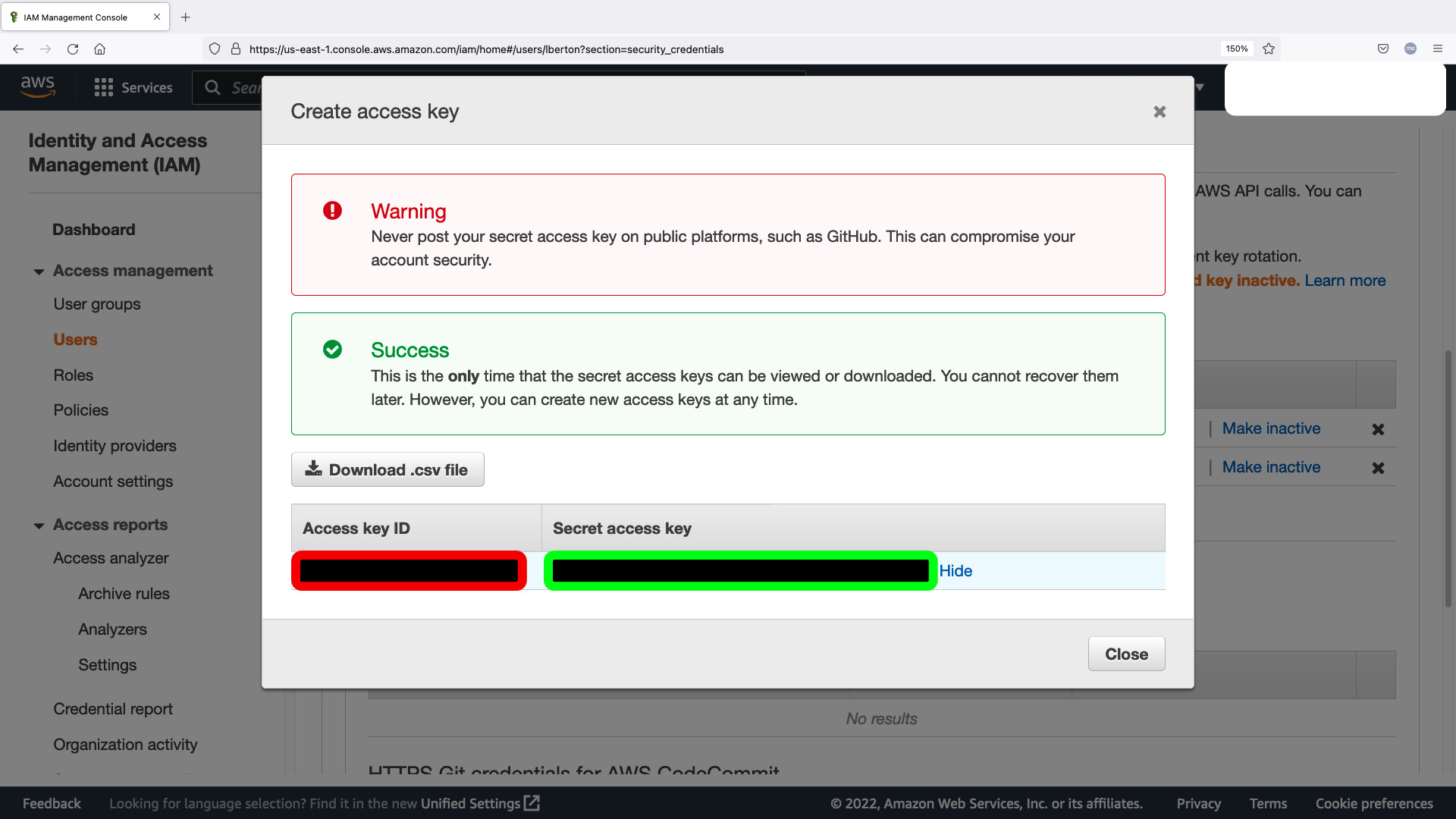
Generate new "Access keys" credential in your Identity and Access Management (IAM) dashboard in your AWS infrastructure account.
You should copy the Access key ID (red below) and Secret access key (green below) for the env.sh shell script.
- env.sh
Please substitute with your Access key ID (red below) and **Sec